
TikTok has become a global phenomenon, capturing the attention of millions of users worldwide. But have you ever wondered, what exactly is your TikTok URL? Your TikTok URL is the unique web address that identifies your TikTok profile. It’s like your online passport in the TikTok world, allowing others to easily find and connect with you.
The concept of a TikTok URL may seem simple, but it plays a crucial role in building your presence on the platform. By sharing your TikTok URL, you can direct people straight to your profile, where they can explore your videos, follow you, and engage with your content. Whether you’re an aspiring influencer, a content creator, or simply someone looking to share fun videos with friends and family, understanding your TikTok URL is essential for growing your presence and connecting with others in the TikTok community.
Contents
Find Your TikTok URL – A Quick Guide
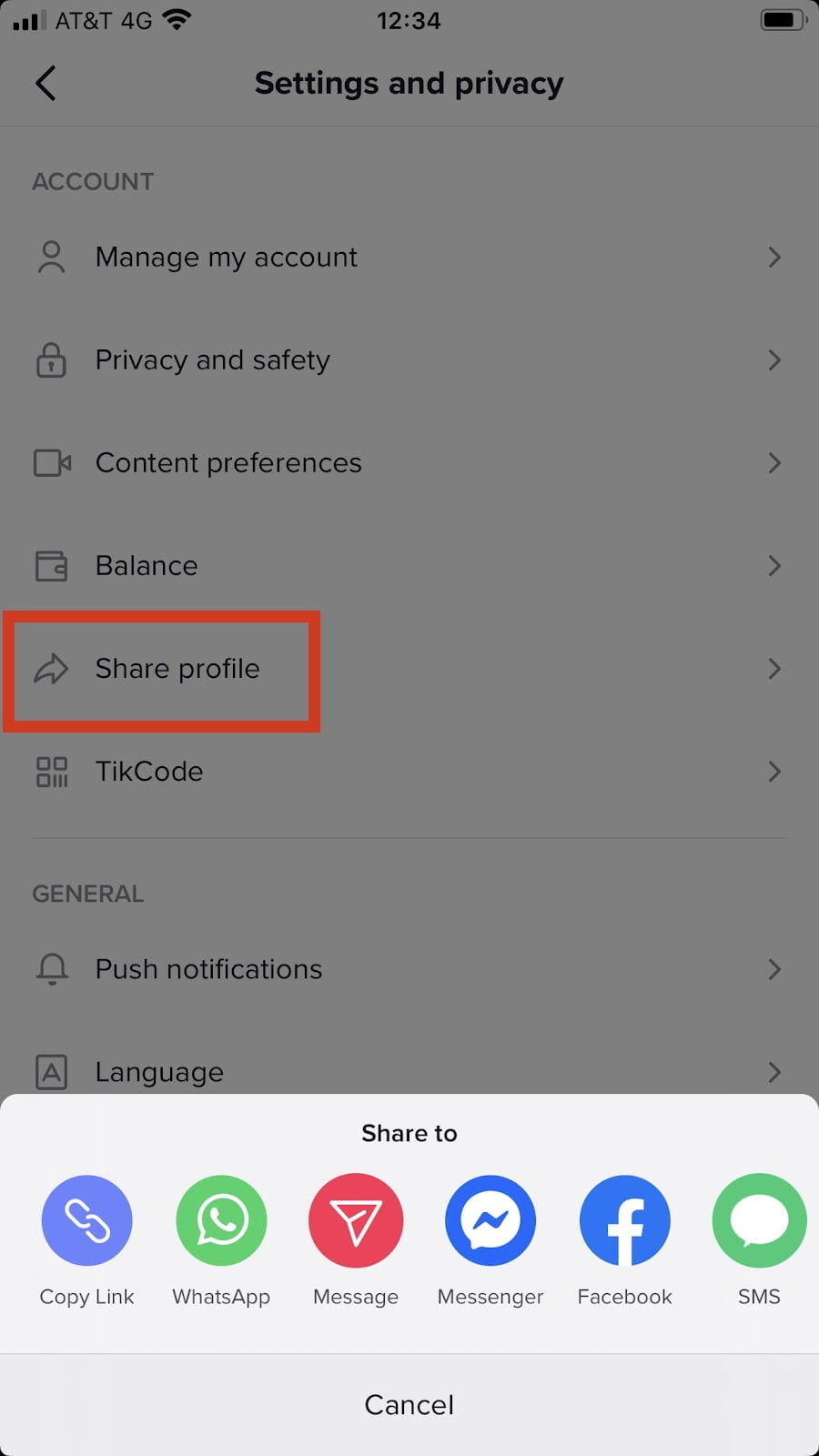
To locate your TikTok URL, follow these simple steps:
- Open the TikTok app on your mobile device.
- Navigate to your profile by tapping the “Me” icon at the bottom right corner.
- Tap on the three dots (…) at the top right corner of your profile.
- Select “Share Profile” from the menu.
- Choose your preferred method of sharing (e.g., copy link, share on social media, etc.).
- Your TikTok URL will be copied to your clipboard or shared through your selected method.
Now you can easily share your TikTok profile with friends, followers, and anyone interested in connecting.
Understanding Your TikTok URL: A Comprehensive Guide
With the increasing popularity of TikTok, many users find themselves wondering about their TikTok URL. Whether you want to share your TikTok profile with friends or promote your content on other platforms, knowing your TikTok URL is essential. In this comprehensive guide, we will explore what a TikTok URL is, how to find it, and how you can customize it to make your profile more memorable. So, if you’ve ever asked yourself, “What is my TikTok URL?”, keep reading to uncover all the answers.
What Is a TikTok URL?
A TikTok URL, also known as a TikTok link or TikTok web address, is the unique web address that directs users to your TikTok profile page. It serves as a digital identifier for your profile, allowing others to easily access and view your content. Think of it as the online location where your TikTok account resides. When someone clicks on your TikTok URL, they are directed to your profile page, where they can follow, like, and engage with your videos.
The TikTok URL typically follows a standard format: “tiktok.com/@username”. The “username” part refers to your unique TikTok handle or username, which is the name you chose for your account. For example, if your username is “exampleuser”, then your TikTok URL would be “tiktok.com/@exampleuser”. This URL can be easily shared across social media platforms, messaging apps, or even embedded in websites to promote your TikTok presence.
How to Find Your TikTok URL
Locating your TikTok URL is a simple process that can be done using the TikTok app or the TikTok website. Here’s how you can find your TikTok URL:
Using the TikTok App:
- Open the TikTok app on your device.
- Navigate to your profile by tapping the “Profile” icon at the bottom right corner of the screen.
- Tap the “Share” icon, which looks like an arrow pointing out of a box.
- From the options that appear, select “Copy Link”.
- Your TikTok URL is now copied to your device’s clipboard and ready to be shared.
Using the TikTok Website:
- Open a web browser on your device and go to tiktok.com.
- Sign in to your TikTok account if you haven’t already.
- Click on your profile picture at the top right corner of the screen.
- In the drop-down menu, select “Profile”.
- Your TikTok URL will appear in the address bar of your web browser.
Once you have your TikTok URL, you can easily share it with others, include it in your social media bios, or use it for promotional purposes.
Customizing Your TikTok URL
By default, your TikTok URL will be a combination of “tiktok.com/@username”. However, TikTok provides an option to customize your URL to make it more personalized and memorable. Here’s how you can customize your TikTok URL:
Using the TikTok App:
- Open the TikTok app on your device.
- Navigate to your profile by tapping the “Profile” icon at the bottom right corner of the screen.
- Tap “Edit Profile”.
- Under the “Username” section, tap “Edit”.
- Enter your desired username and check its availability.
- If available, tap “Save”. Your TikTok URL will now reflect your customized username.
Using the TikTok Website:
- Open a web browser on your device and go to tiktok.com.
- Sign in to your TikTok account if you haven’t already.
- Click on your profile picture at the top right corner of the screen.
- In the drop-down menu, select “Profile”.
- Click on the “Edit” button next to your username.
- Enter your desired username and check its availability.
- If available, click “Save”. Your TikTok URL will now reflect your customized username.
Customizing your TikTok URL can help you establish a unique identity on the platform and make it easier for others to find and remember your profile.
Benefits of Knowing Your TikTok URL
Understanding your TikTok URL and utilizing it effectively can offer several advantages:
- Promotion: Sharing your TikTok profile URL on other social media platforms, websites, or messaging apps can attract more followers and increase your TikTok presence.
- Personal branding: By customizing your TikTok URL, you can create a consistent personal brand across social media platforms and establish a memorable online identity.
- Collaborations and partnerships: Sharing your TikTok URL with potential collaborators or brands can showcase your work and increase opportunities for partnerships or sponsorships.
- Accessibility: Having a unique TikTok URL makes it easier for others to find and access your profile without having to search for it on the app.
Maximizing Your TikTok Presence: Leveraging Your URL
Now that you have a clear understanding of what your TikTok URL is and how to find it, let’s delve into some strategies to maximize your TikTok presence using your URL:
1. Promote Your TikTok on Other Platforms
Take advantage of your TikTok URL by promoting your TikTok profile on other social media platforms such as Instagram, Twitter, or YouTube. Include your TikTok URL in your bio or profile description to direct your followers and viewers to your TikTok content. This cross-platform promotion can help you reach a wider audience and increase your TikTok following.
Additionally, consider embedding your TikTok videos on your personal blog or website using your TikTok URL. This can generate more engagement and drive traffic to both your blog and TikTok profile.
2. Collaborate with other TikTok Creators
Networking and collaboration are essential aspects of TikTok’s community. By partnering with other TikTok creators whose content aligns with yours, you can leverage each other’s audiences and gain more exposure. When collaborating, make sure to include your TikTok URL in the video description or encourage viewers to visit your profile in the comments section, enhancing the chances of gaining new followers.
3. Engage with Your TikTok Community
Interacting with your TikTok community and engaging with your followers is crucial for maintaining an active and loyal audience. Encourage your viewers to visit your TikTok profile by mentioning or displaying your TikTok URL in your videos. This generates curiosity and drives traffic to your profile, allowing users to explore more of your content and potentially follow you.
Additionally, consider using your TikTok URL as a call-to-action in your captions or comments, inviting viewers to visit your profile for exclusive content, giveaways, or challenges. This can create a sense of exclusivity and incentivize users to follow you for more engaging experiences.
4. Optimize Your TikTok URL for SEO
Search Engine Optimization (SEO) techniques can also be applied to your TikTok URL to increase discoverability. Customize your TikTok URL with relevant keywords that describe your content or niche. This can improve your chances of appearing in search results both within the TikTok app and on search engines like Google.
Additionally, include your TikTok URL in your social media profiles, blog posts, or website content, optimizing your online presence. This interlinking allows search engines to recognize your TikTok content as part of your broader online identity, potentially boosting its visibility.
By leveraging these strategies, you can maximize your TikTok presence and increase your followers and engagement, ultimately establishing yourself as a prominent TikTok creator.
In conclusion, your TikTok URL serves as a digital identifier for your TikTok profile, allowing others to easily access and engage with your content. By understanding how to find your TikTok URL and customizing it to make it more personalized, you can enhance your TikTok presence and reach a wider audience. Moreover, by effectively leveraging your TikTok URL through cross-platform promotion, collaborations, community engagement, and SEO optimization, you can maximize your TikTok success and establish yourself as a leading TikTok creator.
How to Find Your TikTok URL
As a professional on TikTok, it’s important to know how to find your TikTok URL. Your TikTok URL is the unique web address that directs people to your TikTok profile. Here’s a simple step-by-step guide to finding your TikTok URL:
- Open the TikTok app on your device.
- Tap on the profile icon at the bottom right corner of the screen.
- On your profile page, tap on the “Share” icon (an arrow pointing right).
- Select the “Copy Link” option from the menu that appears.
- Your TikTok URL is now copied to your device’s clipboard. You can share it with others or use it to promote your TikTok profile.
Remember, your TikTok URL is unique to your profile and can be shared with others to easily direct them to your content on the platform. Utilize your TikTok URL to connect with your audience and grow your presence on TikTok.
Key Takeaways:
- Your TikTok URL is the link that directs users to your TikTok profile.
- Your TikTok URL is unique to your account and cannot be changed.
- To find your TikTok URL, open the app and go to your profile page.
- Your TikTok URL will be displayed at the top of your profile, below your username.
- When sharing your TikTok URL, make sure to double-check that it is correct.
So, to wrap things up, your TikTok URL is a unique web address that allows others to easily find and access your TikTok profile. It’s an important tool for building your online presence and connecting with your audience.
If you’re wondering what your TikTok URL is, there are a few simple steps you can follow to find it. First, open the TikTok app on your device and go to your profile page. Then, click on the “Share” icon, and you will see your TikTok URL displayed. You can copy it and share it with others through various means, such as social media, messaging apps, or email.