
In today’s fast-paced digital world, laptops have become an essential tool for work, entertainment, and communication. As technology advances, the need for faster and more powerful laptops is becoming increasingly important. One of the key factors that determine the speed and performance of a laptop is its processing power, which is measured in gigahertz (GHz).
If you’re in the market for a new laptop or are simply curious about the ideal GHz for your device, you’ve come to the right place. In this article, we’ll delve into the world of GHz and explore how it affects the performance of your laptop. From understanding the basics of GHz to exploring the different types of processors available in the market, we’ll provide you with all the information you need to make an informed decision about your next laptop purchase. So, let’s get started and find out how many GHz your laptop should have.
The GHz (Gigahertz) of a laptop determines its processing speed. For basic tasks like browsing and emailing, a laptop with a 1.6 GHz processor should suffice. However, for more demanding tasks like video editing or gaming, a laptop with a processor speed of 3.5 GHz or higher is recommended. It’s important to note that GHz alone doesn’t determine a laptop’s performance, as other factors like the number of cores and cache size also play a crucial role.
Contents
How Many GHz Should a Laptop Have?
When it comes to buying a laptop, the processor is one of the most important components to consider. The processor’s speed is measured in GHz (Gigahertz), and it determines how fast your laptop can perform tasks. But how many GHz should a laptop have? In this article, we’ll explore the optimal GHz range for laptops and the factors to consider when making your purchase decision.
Understanding GHz
GHz is a unit of measurement that represents the clock speed of a processor. It refers to the number of cycles that a processor can execute per second. The higher the number of GHz, the faster the processor can perform tasks. However, a higher GHz doesn’t necessarily mean better performance if other factors such as the number of cores and the processor’s architecture are not considered.
When it comes to laptops, the optimal GHz range depends on the tasks that you will be performing. For basic tasks such as web browsing, email, and document editing, a laptop with a processor speed of 1.6 GHz to 2.4 GHz should suffice. However, if you plan on running more demanding applications such as video editing or gaming, you will need a laptop with a higher GHz range.
The Optimal GHz Range for Laptops
The optimal GHz range for laptops depends on the processor’s architecture and the number of cores. Intel and AMD are the two main processor manufacturers in the market, and they offer a range of processors with varying GHz speeds and core counts.
For basic tasks, an Intel Core i3 or AMD Ryzen 3 processor with a speed of 1.6 GHz to 2.4 GHz should suffice. For more demanding tasks such as video editing or gaming, an Intel Core i5 or AMD Ryzen 5 processor with a speed of 2.5 GHz to 3.5 GHz is recommended. If you are a professional video editor or gamer, an Intel Core i7 or AMD Ryzen 7 processor with a speed of 3.5 GHz or higher will provide optimal performance.
The Benefits of a Higher GHz Range
A higher GHz range provides several benefits, including faster processing speeds, better multitasking capabilities, and smoother performance when running demanding applications. If you are a heavy user who runs multiple applications simultaneously or works with large files, a laptop with a higher GHz range will provide a more seamless experience.
The Downsides of a Higher GHz Range
While a higher GHz range provides better performance, it also comes with a few downsides. Laptops with higher GHz ranges tend to be more expensive, and they consume more power, leading to shorter battery life. Additionally, laptops with higher GHz ranges tend to generate more heat, which can lead to overheating and reduced performance.
GHz vs. Cores
When it comes to choosing a laptop processor, the GHz range is not the only factor to consider. The number of cores also plays a crucial role in determining performance. Cores are essentially additional processing units within a processor, and they allow a laptop to perform multiple tasks simultaneously.
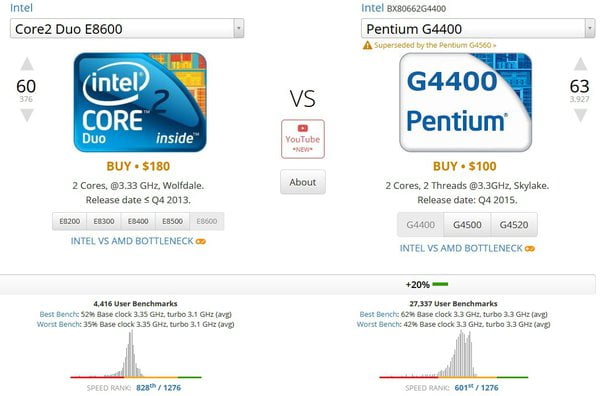
A laptop with a higher GHz range and more cores will provide better performance than a laptop with a higher GHz range and fewer cores. For example, an Intel Core i5 processor with four cores and a speed of 2.5 GHz will provide better performance than an Intel Core i5 processor with two cores and a speed of 3.5 GHz.
Conclusion
In conclusion, the optimal GHz range for a laptop depends on the tasks that you will be performing. For basic tasks, a laptop with a processor speed of 1.6 GHz to 2.4 GHz should suffice, while for more demanding tasks, a laptop with a higher GHz range and more cores is recommended. When choosing a laptop processor, it’s essential to consider factors such as the processor’s architecture, the number of cores, and the GHz range to ensure optimal performance.
Key Takeaways: How Many GHz Should a Laptop Have?
- GHz stands for Gigahertz, which is a measure of a laptop’s processing speed.
- The GHz of a laptop determines how quickly it can carry out tasks and run applications.
- The minimum GHz a laptop should have is 2.4GHz, although higher GHz is recommended for more intensive tasks.
- A laptop with a higher GHz can handle multitasking and running several applications simultaneously without lagging.
- When purchasing a laptop, it’s important to consider the processor’s GHz along with other factors such as RAM, storage, and graphics card.
- A laptop with a higher GHz may come at a higher cost, but it’s worth investing in if you need a computer with more power and speed.
In conclusion, when looking for a laptop, it’s essential to consider the GHz of the processor. A higher GHz means a faster and more efficient laptop that can handle more demanding tasks. However, it’s important to balance the GHz with other factors such as RAM and storage to ensure optimal performance. Ultimately, investing in a laptop with a higher GHz can provide better user experience and productivity in the long run.
Why CPU GHz Doesn’t Matter!
As a professional writer, I understand the importance of having a high-performance laptop that can handle all your work demands. One of the crucial factors that determine a laptop’s speed and performance is its processor speed, which is measured in Gigahertz (GHz). So, the question “How many GHz should a laptop have?” is a common one among laptop buyers, especially those who use their laptops for demanding tasks like video editing, gaming, or programming.
The answer to this question depends on your specific needs and budget. Generally, a laptop with a processor speed of 2GHz or higher is good enough for most tasks, including web browsing, word processing, and multimedia consumption. However, if you are a power user who runs multiple applications simultaneously or engages in CPU-intensive activities like video rendering or 3D modeling, you may need a laptop with a processor speed of 3GHz or higher. Ultimately, the decision of how many GHz your laptop should have depends on your workload and budget, so make sure to do your research and choose wisely.