
Are you seeking ways to maintain your privacy and hide your followers on TikTok? In a world where social media can expose every aspect of our lives, it’s essential to have control over our online presence. Fortunately, there are methods you can employ to hide your followers on TikTok, ensuring your privacy and allowing you to enjoy the platform without worrying about who is watching.
When it comes to hiding followers on TikTok, understanding the platform’s features is crucial. TikTok allows users to switch their account privacy settings from public to private, limiting the visibility of your content and followers. By opting for a private account, you can control who can follow you, ensuring that only approved individuals can view your content and follower count. This feature provides a sense of security and privacy, allowing you to enjoy TikTok on your own terms.
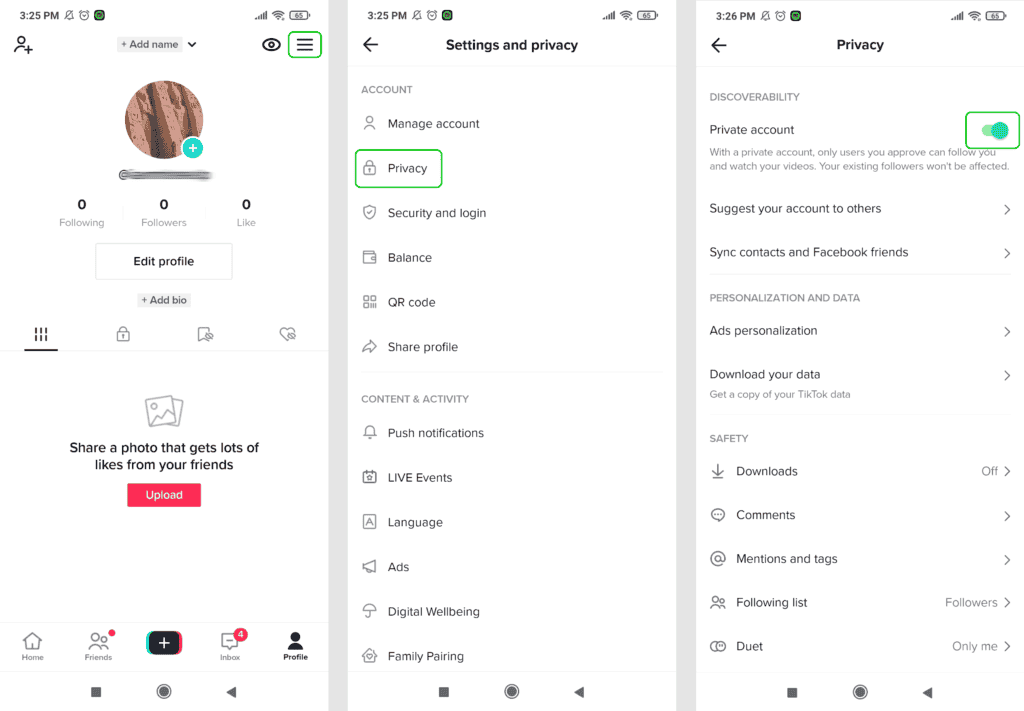
There is no direct way to hide your followers on TikTok. However, you can make your account private, which means only approved followers can see your content and follower count. To do this, go to your profile, tap the three dots in the top right corner, select “Privacy and safety,” and then enable the “Private account” option. Keep in mind that this will also hide your profile from search results. Remember to regularly review your followers and remove any unwanted ones to maintain your privacy.
Contents
Introduction: Why Hide Followers on TikTok?
TikTok is a popular social media platform that allows users to create and share short videos. With its ever-growing user base, many TikTok users may find themselves wanting to hide their followers for various reasons. Whether it’s for privacy concerns, avoiding unwanted attention, or maintaining a sense of mystery, hiding your followers on TikTok can give you more control over your online presence. In this article, we will explore different methods to hide your followers on TikTok so that you can enjoy using the platform without worrying about who can see your follower count.
Method 1: Switch to a Private Account
An effective way to hide your followers on TikTok is by switching your account to private. By default, TikTok accounts are public, which means anyone can see your profile, videos, and follower count. However, if you switch to a private account, only your approved followers will be able to see your content and follower count.
To switch to a private account on TikTok:
- Open the TikTok app on your device and go to your profile page.
- Tap on the three horizontal dots in the top right corner to access the settings.
- Scroll down and select “Privacy and Safety.”
- Toggle on the “Private Account” option.
Once you’ve switched to a private account, only users who request to follow you will be able to see your follower count. This provides more control over who can view your profile and ensures that only people you approve can engage with your content.
Method 2: Remove Followers Individually
If you want to hide specific followers without switching to a private account, you can remove them individually. This method is useful when you want to maintain a public account but hide certain followers for personal reasons.
To remove followers on TikTok:
- Open the TikTok app and go to your profile page.
- Tap on the “Following” count to view your followers.
- Scroll through the list of followers and find the user you want to remove.
- Tap on their profile to open it.
- Tap on the three dots in the top right corner and select “Remove this follower.”
By removing followers individually, you can maintain a public account while keeping certain followers hidden. This method allows you to curate your follower list to your preference and have more control over who can see your profile and follower count.
Method 3: Block Unwanted Followers
If you have unwanted followers or accounts that make you uncomfortable, blocking them is an effective way to hide them on TikTok. Blocking a user means they won’t be able to see your profile, follower count, or engage with your content.
To block followers on TikTok:
- Go to your profile page on the TikTok app.
- Tap on the “Followers” count to view your followers.
- Scroll through the list and find the user you want to block.
- Tap on their profile to open it.
- Tap on the three dots in the top right corner and select “Block.”
Blocking unwanted followers not only hides them from your follower count but also ensures that they cannot interact with your content. This method provides a level of protection and privacy for users who want to maintain a positive and comfortable TikTok experience.
Method 4: Limit Sensitive Content
If you want to hide your followers without completely blocking or removing them, you can limit the visibility of your sensitive content. By enabling the “Limit Sensitive Content” option, TikTok will hide your videos from viewers who may find the content inappropriate.
To limit sensitive content on TikTok:
- Open the TikTok app and go to your profile page.
- Tap on the three horizontal dots in the top right corner to access the settings.
- Select “Privacy and Safety.”
- Toggle on the “Limit Sensitive Content” option.
By enabling this option, TikTok will classify your videos as potentially sensitive and hide them from viewers who do not want to see such content. This restricts the visibility of your videos and indirectly hides your followers from certain audiences.
Exploring a Different Dimension: How To Hide Followers on TikTok?
While the methods mentioned earlier can help hide your followers on TikTok, it’s important to note that the platform does not have a built-in feature that allows you to selectively hide your follower count. However, by leveraging some creative strategies, you can indirectly minimize the visibility of your follower count.
Method 1: Strategic Video and Profile Settings
One effective way to minimize the visibility of your follower count is by carefully selecting your video and profile settings. By default, TikTok displays your follower count on your profile page. However, you can make a few adjustments to minimize its visibility.
Consider following these tips:
- Set your profile to a private account to limit the visibility of your follower count to approved followers only.
- Avoid showcasing your follower count in videos or captions, as this can draw unnecessary attention.
- Focus on creating engaging content that stands out, rather than relying on follower count as a measure of credibility.
- Experiment with video themes that do not highlight follower count, such as educational content or creative challenges.
By strategically adjusting your video and profile settings, you can direct the focus towards your content rather than your follower count.
Method 2: Collaborate with Influencers
Collaborating with popular TikTok influencers can help shift the attention away from your follower count. By joining forces with influencers who have a large following, your content can reach a wider audience, and the emphasis will be on the collaboration rather than your individual follower count.
To collaborate with influencers:
- Identify influencers within your niche who align with your content or brand.
- Reach out to them through direct messages or email to propose a collaboration or partnership.
- Create meaningful and engaging content together that resonates with both your audiences.
- Promote the collaboration on both your profiles, redirecting attention from follower counts to the collaborative effort.
By collaborating with influencers, you can leverage their existing follower base to showcase your content, diverting attention from your follower count and focusing on the collaboration itself.
Method 3: Engage with Your Audience
Building a strong and engaged community on TikTok can help shift the focus away from your follower count. By actively interacting with your audience and nurturing relationships, you can cultivate a loyal following that values your content beyond just numbers.
Consider the following tips:
- Respond to comments and direct messages to show your audience that you appreciate their engagement.
- Create content that encourages participation and conversation, such as Q&A sessions or opinion polls.
- Engage with other TikTok users by liking, commenting, and sharing their content.
- Collaborate with your followers by featuring their content or ideas in your videos.
By actively engaging with your audience, you can create a sense of community that values your content for its quality rather than the number of followers you have.
Method 4: Focus on Quality Content
In the end, the most important aspect of building a thriving presence on TikTok is focusing on creating high-quality content that resonates with your target audience. By consistently delivering valuable and entertaining videos, you can attract followers who genuinely appreciate your content, regardless of the visible follower count.
Consider the following tips:
- Invest time in planning and executing your videos to ensure they are visually appealing and engaging.
- Stay updated with the latest trends and challenges on TikTok to keep your content fresh and relevant.
- Experiment with different video formats and styles to find what works best for your niche.
- Listen to feedback from your audience and adapt your content accordingly.
By focusing on quality content, you can capture the attention and loyalty of your audience, making your follower count less significant in the grand scheme of your TikTok presence.
In conclusion, while TikTok does not offer a direct feature to hide your follower count, there are several methods you can use to achieve a similar outcome. Switching to a private account, removing individual followers, blocking unwanted followers, and limiting sensitive content are effective ways to control who can see your followers on TikTok. Additionally, strategic video and profile settings, collaborating with influencers, engaging with your audience, and focusing on quality content can indirectly minimize the visibility and importance of your follower count. By implementing these methods, you can enjoy using TikTok while maintaining the level of privacy and control over your followers that you desire.
How To Hide Followers On Tiktok?
As a professional user of TikTok, you may want to hide your followers for various reasons. Fortunately, there are a few methods that can help you achieve this:
- Make your account private: By setting your account to private, only approved followers will be able to see your content.
- Turn off “Allow Others to Find Me”: By disabling this option in your privacy settings, it will be more difficult for others to find your profile and follow you.
- Block unwanted followers: If there are specific followers you’d like to hide from, you can block them individually.
- Control reactions and comments: Adjusting your settings to limit who can react to your videos and comment on them can help reduce the visibility of your followers.
Remember, hiding your followers on TikTok may impact your engagement and reach, as fewer people will be able to see your content. It’s important to weigh the benefits and drawbacks before making this decision.
Key Takeaways: How To Hide Followers On Tiktok
- Open the TikTok app and go to your profile page.
- Click on the three horizontal dots in the top-right corner to access your settings.
- Tap on “Privacy and Safety” to open the privacy settings.
- Select “Who Can See Your Followers” and choose from the options: Everyone, Friends, or Only Me.
- If you want to hide your followers completely, select “Only Me”.
In conclusion, hiding followers on TikTok can be a useful feature for those who value their privacy or simply want to manage their audience more effectively. By following the steps mentioned earlier, including adjusting your privacy settings and blocking certain users, you can hide your followers and ensure that only the people you want to see your content have access to it.
Remember that while hiding your followers can provide a sense of control and security, it’s also important to engage with your audience and foster a positive online community. Balance your desire for privacy with the desire to connect with your followers, and you’ll enjoy a fulfilling TikTok experience.