
As a laptop user, you may often find yourself needing to access the inner components of your device. Whether you need to upgrade your RAM, replace your hard drive, or simply clean out the dust from your fans, getting to the internals of your computer is an essential skill. However, the process of removing the back cover of your laptop can seem daunting, especially if you’re not familiar with the proper techniques.
If you own an HP 15 laptop and need to remove the back cover, don’t worry! In this guide, we’ll walk you through the step-by-step process of safely removing the back cover of your HP 15 laptop. Whether you’re a seasoned computer technician or a beginner, by the end of this article, you’ll be able to confidently remove the back cover of your laptop and access the components inside. So, let’s get started!
- Shut down your laptop and disconnect all cables and power source.
- Flip the laptop over and locate the battery release latch.
- Slide the latch towards the unlock symbol and gently lift the battery out of the laptop.
- Use a screwdriver to remove all visible screws from the bottom of the laptop.
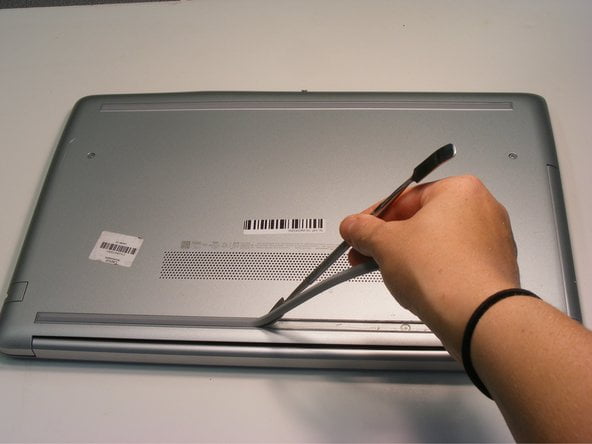
- Gently pry off the back cover using a plastic opening tool or your fingers.
This step-by-step tutorial will guide you on how to remove the back cover of an HP 15 laptop. Make sure to disconnect all cables and power source and follow the instructions carefully to avoid any damage to your device.
Contents
How to Remove Back Cover of Hp 15 Laptop?
Removing the back cover of an HP 15 laptop can be a daunting task if you don’t know where to start. However, with the right tools and a little bit of know-how, you can quickly and easily remove the back cover of your HP 15 laptop without damaging it. Here’s everything you need to know.
Tools You’ll Need
Before you start, you will need a Phillips head screwdriver, a plastic pry tool, and an anti-static wrist strap. The anti-static wrist strap is essential to prevent static electricity from damaging your laptop’s delicate components.
To remove the back cover of your HP 15 laptop, you will need to follow these steps:
Step 1: Power Off and Unplug Your Laptop
Before you begin, make sure your laptop is completely powered off and unplugged from the wall. This will prevent any accidental electrical shocks or damage to your laptop.
Step 2: Remove the Battery
Next, flip your laptop over and locate the battery release latch. Slide the latch to the unlock position and remove the battery from your laptop.
Step 3: Remove the Screws
Using your Phillips head screwdriver, remove all the screws from the back cover of your laptop. Be sure to keep the screws organized and separate from each other to avoid confusion when you’re reassembling your laptop.
Step 4: Remove the Back Cover
Once you have removed all the screws, use your plastic pry tool to gently pry off the back cover of your laptop. Be careful not to force it or use too much pressure, as this could damage your laptop’s components.
Benefits of Removing the Back Cover
Removing the back cover of your HP 15 laptop is a necessary step if you need to upgrade or replace any of its components, such as the hard drive or RAM. Additionally, removing the back cover can also provide better access to clean the fan or replace it if necessary.
Vs. Getting it Professionally Done
While it is possible to remove the back cover of your HP 15 laptop yourself, it’s important to note that doing so could void your warranty. If you’re not comfortable with doing it yourself, or if you’re worried about damaging your laptop, it’s always best to get it professionally done.
Conclusion
Removing the back cover of your HP 15 laptop is a straightforward process that anyone can do with the right tools and a little bit of know-how. Whether you’re upgrading your laptop’s components or simply cleaning the fan, following these steps will ensure that you do it safely and without damaging your laptop.
Key Takeaways: How to Remove Back Cover of HP 15 Laptop?
Here are the key takeaways to keep in mind when removing the back cover of your HP 15 laptop:
- Ensure that your laptop is turned off and unplugged before attempting to remove the back cover.
- Use a small Phillips-head screwdriver to remove the screws that are securing the back cover in place.
- Keep track of the screws and their placement, as some may be longer or shorter than others.
- Once all screws have been removed, gently pry the back cover off by using a plastic opening tool or the edge of a credit card.
- Be careful not to damage any of the internal components or wires when removing the back cover.
- If you encounter any resistance when removing the back cover, double-check that all screws have been removed and that there are no clips or other securing mechanisms still in place.
- When reassembling your laptop, make sure that the back cover is securely in place and that all screws have been tightened to the appropriate level.
By following these tips, you can safely and effectively remove the back cover of your HP 15 laptop for maintenance or repair purposes.
HP 15-DA (15-da0094TU) disassembly take apart for memory, HDD or SSD upgrade
Removing the back cover of an HP 15 Laptop may seem like a daunting task, especially if you are not familiar with the technicalities of laptop hardware. However, with the right tools and guidance, it is a relatively simple procedure that can be done by anyone. It is important to note that before attempting to remove the back cover, you should ensure that your laptop is turned off and unplugged to avoid any electrical mishaps.
In conclusion, the process of removing the back cover of an HP 15 Laptop requires patience, attention to detail, and the right tools. It is recommended that you follow a step-by-step guide or watch a tutorial video to ensure that you do it correctly. With the back cover removed, you can access the internal components of your laptop and perform any necessary repairs or upgrades. Remember to be cautious and careful throughout the process to avoid causing any damage to your device.